> For the complete documentation index, see [llms.txt](https://3pod.gitbook.io/3pod-docs/llms.txt). Markdown versions of documentation pages are available by appending `.md` to page URLs; this page is available as [Markdown](https://3pod.gitbook.io/3pod-docs/procesos/billetera-3pod.md).
# Billetera 3Pod
## ¿Cómo utilizar la Billetera 3Pod?
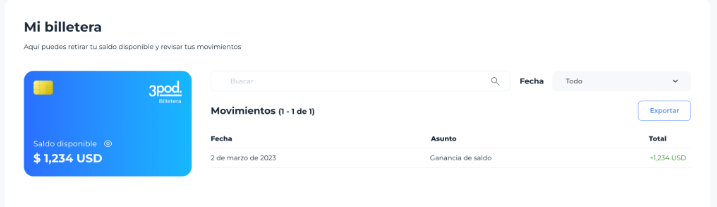
Funciones actuales que puedes usar con la billetera electrónica de 3Pod:
* Recibir los fondos proporcionados por el servicio de afiliados al referir usuarios a 3Pod.
* Recibir pagos recurrentes provenientes de nuestro programa de afiliados 3Pod.
* Se puede recibir fondos en la billetera por promociones 3Pod, o premios que se realicen en la plataforma 3Pod.
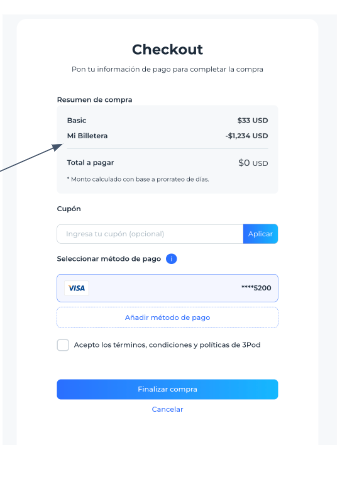
* Este servicio de billetera 3Pod puede ser usado como método de pago dentro de la plataforma 3Pod únicamente puede adquirir cualquier tipo de membresía o servicio dentro de esta misma.
* Puede recibir fondos en la billetera 3Pod por concepto de devoluciones.
También vas a poder realizar el pago de la membresía con tu billetera de 3Pod
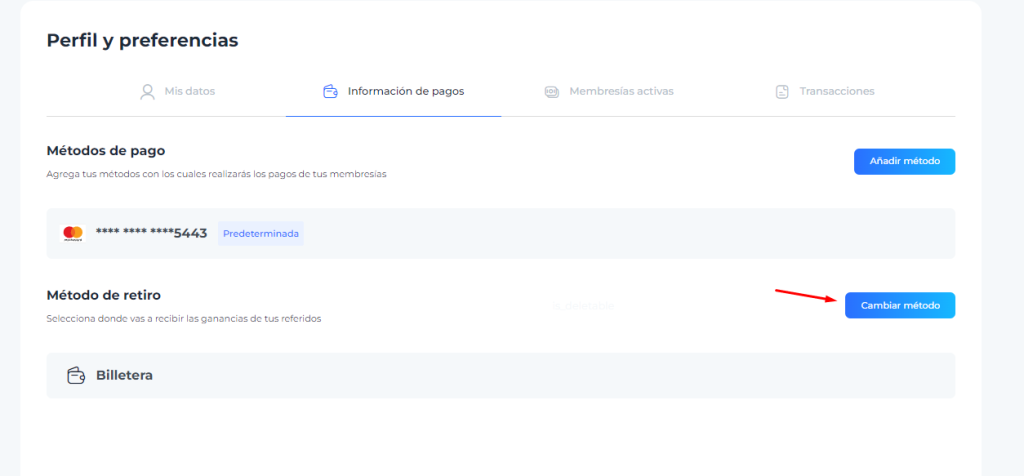
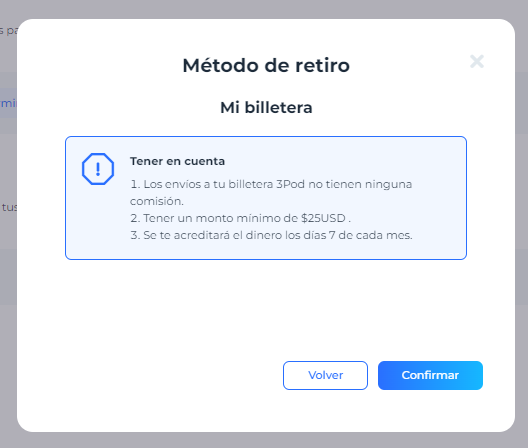
Lo vas a poder utilizar también como método de retiro de las comisiones a tu billetera bajo ciertas condiciones. Solo debes de ingresar perfiles y preferencias y agregar la billetera como método de retiro.
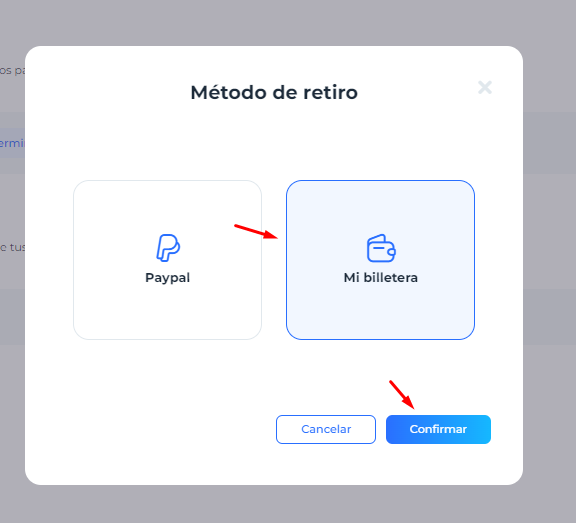
Seleccionamos la billetera.
Aquí vas a poder ver las condiciones para agregar el dinero a tu billetera. Ahora le das clic en confirmar y listo ya agregaste tu billetera para recibir dinero.
---
# Agent Instructions
This documentation is published with GitBook. GitBook is the documentation platform designed so that both humans and AI agents can read, navigate, and reason over technical content effectively. Learn more at gitbook.com.
## Querying This Documentation
If you need additional information that is not directly available in this page, you can query the documentation dynamically by asking a question.
Perform an HTTP GET request on the current page URL with the `ask` query parameter:
```
GET https://3pod.gitbook.io/3pod-docs/procesos/billetera-3pod.md?ask=
```
The question should be specific, self-contained, and written in natural language.
The response will contain a direct answer to the question and relevant excerpts and sources from the documentation.
Use this mechanism when the answer is not explicitly present in the current page, you need clarification or additional context, or you want to retrieve related documentation sections.